
August Data Cleanup Focus and Progress Updates
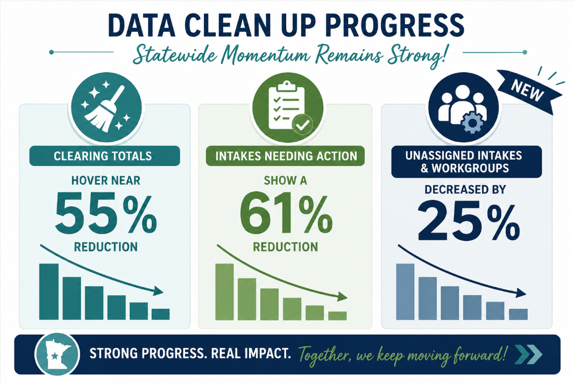
As we transition into August, agencies continue to make strong progress across cleanup focus areas.
Progress Update
August Focus: Inactive SSIS User Access Cleanup
This month’s cleanup priority is an important one for both system security and IT resource management. Inactive User Access Cleanup should focus on users with 90+ days since last login who still have an active SSIS role or temp role and/or Active Directory access setup.
Agencies should review SSIS access for all staff who have not logged in for 90 days or more. Currently, over 4,000 agency users, statewide, still hold an active SSIS role despite being inactive for 90 or more days, including many who have never logged into SSIS.
To assist with this review, SSIS Admin’s User Search grid includes optional grid columns for Last Logon Date and Days Since Last Logon, each of which was added last year to assist agency administrators with effective user management.
Why this cleanup matters
Inactive accounts pose security concerns as well as monthly costs. DCYF is charged $17 per user per month for SSIS Active Directory access—regardless of whether the user logs in. Cleaning up inactive accounts ensures that IT dollars are being used effectively and not lost on users that don’t need current SSIS access.
Resources
Agencies can use the following resources to assist in reviewing/inactivating inactive SSIS user accounts:
User (Search, Add, Edit, Inactivate) – Guidance for searching, adding, editing and inactivating users.
SSIS Administration Overview – Overview of SSIS Admin features.
- SSIS Coffee Talk Archive –the April 21, 2026 Coffee Talk archive - slides 31-32 shows how to set up the User Search Grid in SSIS Admin to quickly identify inactive users. When reviewing the grid, filter out blanks, State Employee, and External Placement Case Manager from the Employee Type column, since these staff are not included in inactive user counts. Then sort or filter by either the Days Since Last Log On or Last Log On Date column to locate users who may need access review. A more detailed reminder on adjusting the grid for this use will also be included in the next SSIS Update.
NEW: SSIS User Inactivation One‑Page Reference SSIS User Inactivation
Engagement & Communication Updates
Outreach will continue to agencies with high totals of inactive users and to agencies still carrying significant backlogs in earlier clean up focus areas.
Thank you for your continued engagement in strengthening statewide data quality. Your efforts are making a noticeable difference. For questions or support, please check out resources and information shared in this and previous data cleanup posts, and when needed contact dcyf.ssishelp@state.mn.us for additional assistance.

Thank you for your contribution!
Help us reach out to more people in the community
Share this with family and friends