Recent changes to Child Care Assistance Program (CCAP) provider registration process

Share Recent changes to Child Care Assistance Program (CCAP) provider registration process on Facebook Share Recent changes to Child Care Assistance Program (CCAP) provider registration process on Twitter Share Recent changes to Child Care Assistance Program (CCAP) provider registration process on Linkedin Email Recent changes to Child Care Assistance Program (CCAP) provider registration process link

Recent changes to Child Care Assistance Program (CCAP) provider registration process

As of April 28, 2025, Child Care Assistance Program (CCAP) child care provider registration, renewal, and maintenance shifted to a centralized system administered by the Department of Children, Youth, and Families (DCYF) Provider Support Team. This means child care providers no longer need to maintain CCAP registrations with multiple CCAP agencies (counties, Tribes and subcontracted agencies). Child care providers only need to maintain their CCAP registration with DCYF.

Additionally, all registered CCAP providers have the option to access MEC² PRO and submit Billing Forms electronically.

These changes make it faster and easier for providers to register for CCAP and receive payments.


What hasn’t changed?

The requirements to register as a provider did not change. For more information about CCAP registration and program rules, see the Minnesota Child Care Assistance Program (CCAP) Provider Guide (DHS-5260) (PDF).

Local agencies continue to process bills, issue payments to CCAP providers, and manage families’ CCAP cases. If you have questions about:

  • A specific family’s eligibility or authorization

  • How to bill for a specific family’s child care expenses

  • A payment you received

Contact the family’s worker or the CCAP agency. For more information about contacting CCAP agencies, see the guide under “Local CCAP Agency Contact information” on the right-hand menu.


How will providers manage CCAP registration information with DCYF?

The Provider Hub is a website that the state of Minnesota uses to manage provider's child care information. Using the CCAP Provider Management feature in the Provider Hub, child care providers can:

  • Register for CCAP

  • Renew their CCAP registration

  • Report changes to their CCAP information

  • Submit request to add a user to MEC2 PRO online billing

  • View their CCAP notices

Steps to access the CCAP Provider Management feature:

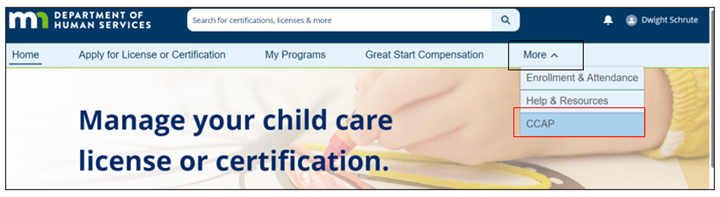
  • Locate the “CCAP” button on the top ribbon in the Provider Hub. This may be under the “More” tab.

NOTE: Only Provider Hub users with delegated authority access can submit CCAP information using the Provider Hub.

What if I have more questions?

Review the FAQs on the right-hand menu. If your question is not there, click the “Send us a Question” button below so we can add it to our FAQs. If you want a direct response, include your contact information.


About privacy on this site

Your comments on this site are visible to other users. Please do not share names or other information that would make people or agencies identifiable in your public comments. If you have feedback you want to provide that contains a family or child's name, or names a county, Tribe or agency, please email us directly at CCAP.Providers.DCYF@state.mn.us.

Recent changes to Child Care Assistance Program (CCAP) provider registration process

As of April 28, 2025, Child Care Assistance Program (CCAP) child care provider registration, renewal, and maintenance shifted to a centralized system administered by the Department of Children, Youth, and Families (DCYF) Provider Support Team. This means child care providers no longer need to maintain CCAP registrations with multiple CCAP agencies (counties, Tribes and subcontracted agencies). Child care providers only need to maintain their CCAP registration with DCYF.

Additionally, all registered CCAP providers have the option to access MEC² PRO and submit Billing Forms electronically.

These changes make it faster and easier for providers to register for CCAP and receive payments.


What hasn’t changed?

The requirements to register as a provider did not change. For more information about CCAP registration and program rules, see the Minnesota Child Care Assistance Program (CCAP) Provider Guide (DHS-5260) (PDF).

Local agencies continue to process bills, issue payments to CCAP providers, and manage families’ CCAP cases. If you have questions about:

  • A specific family’s eligibility or authorization

  • How to bill for a specific family’s child care expenses

  • A payment you received

Contact the family’s worker or the CCAP agency. For more information about contacting CCAP agencies, see the guide under “Local CCAP Agency Contact information” on the right-hand menu.


How will providers manage CCAP registration information with DCYF?

The Provider Hub is a website that the state of Minnesota uses to manage provider's child care information. Using the CCAP Provider Management feature in the Provider Hub, child care providers can:

  • Register for CCAP

  • Renew their CCAP registration

  • Report changes to their CCAP information

  • Submit request to add a user to MEC2 PRO online billing

  • View their CCAP notices

Steps to access the CCAP Provider Management feature:

  • Locate the “CCAP” button on the top ribbon in the Provider Hub. This may be under the “More” tab.

NOTE: Only Provider Hub users with delegated authority access can submit CCAP information using the Provider Hub.


What if I have more questions?

Review the FAQs on the right-hand menu. If your question is not there, click the “Send us a Question” button below so we can add it to our FAQs. If you want a direct response, include your contact information.


About privacy on this site

Your comments on this site are visible to other users. Please do not share names or other information that would make people or agencies identifiable in your public comments. If you have feedback you want to provide that contains a family or child's name, or names a county, Tribe or agency, please email us directly at CCAP.Providers.DCYF@state.mn.us.

Registration and Renewal Q & A

Submit your question about CCAP registration and renewal changes here. A CCAP staff member will respond to your question within three business days. 

You need to be signed in to add your question.

  • Share I am trying to re-activate our Mec2Pro account. When I log in to the Provider Hub, I go to the CCAP tab it shows 'no license found - apply for new license'. Can you help? on Facebook Share I am trying to re-activate our Mec2Pro account. When I log in to the Provider Hub, I go to the CCAP tab it shows 'no license found - apply for new license'. Can you help? on Twitter Share I am trying to re-activate our Mec2Pro account. When I log in to the Provider Hub, I go to the CCAP tab it shows 'no license found - apply for new license'. Can you help? on Linkedin Email I am trying to re-activate our Mec2Pro account. When I log in to the Provider Hub, I go to the CCAP tab it shows 'no license found - apply for new license'. Can you help? link

    I am trying to re-activate our Mec2Pro account. When I log in to the Provider Hub, I go to the CCAP tab it shows 'no license found - apply for new license'. Can you help?

    MAICC Ex Dir asked 2 months ago

    You must have “Delegated Authority” user access in the Provider Hub to manage CCAP registration information for a license. 

    • If you are a Minnesota licensed or certified center and do not have “Delegated Authority” user access, contact your program's designated Authorized Agent. If the Authorized Agent wants you to manage CCAP registration, they will need to update your user access for the program. They can reference Provider Hub: Add a User and Change Existing User Access for information on user access changes.
    • If you are a center or family child care provider licensed by a Tribal nation or another site, you will need to first "claim" your registration by selecting "Register or renew as a Not licensed by the State of Minnesota (Licensed by another state or Tribe)" before you can submit changes or manage your MEC² PRO account.
    • If you are a Minnesota licensed family child care provider, do not set up your own Provider Hub account. Please contact DCYF CCAP Provider Support Team to help resolve this issue.


    If you have additional questions, contact DCYF CCAP Provider Support at CCAP.Providers.DCYF@state.mn.us or 651-431-4848.

  • Share Wondering which address should be used for tax purposes. Site address or business address? We are part of a public school district. Thank you! on Facebook Share Wondering which address should be used for tax purposes. Site address or business address? We are part of a public school district. Thank you! on Twitter Share Wondering which address should be used for tax purposes. Site address or business address? We are part of a public school district. Thank you! on Linkedin Email Wondering which address should be used for tax purposes. Site address or business address? We are part of a public school district. Thank you! link

    Wondering which address should be used for tax purposes. Site address or business address? We are part of a public school district. Thank you!

    amcoffman asked about 1 month ago

    If you are licensed or certified by the state of Minnesota, the tax information you provide to CCAP must match the license holder information (program account information) you provided to your licensing under Minn. Stat. §245A.04, subd. 7a(b). If you are not sure what the correct address is, consult with a tax professional or the person in your organization that manages tax compliance.

    For centers, to view or update your program account information in the Provider Hub, see guidance in this Knowledge Article: https://providerhub.mn.gov/s/article/Licensed-Centers-Request-a-Change-to-Your-Program-Account-Information-in-the-Provider-Hub 

    For licensed family child care providers, report all tax information changes to your licensor so they can submit a license update form (DHS-3324). This includes updating your tax ID from your SSN (social security number) to a FEIN/EIN (Federal Employer Identification Number. CCAP must verify with your licensor that you've updated your tax information before we can approve a change in your CCAP tax information.

    If you have more specific questions or a special case, contact the DCYF CCAP Provider Support Team directly at CCAP.Providers.DCYF@state.mn.us or 651-431-4848.

  • Share Where can I find a template for a parent handbook? on Facebook Share Where can I find a template for a parent handbook? on Twitter Share Where can I find a template for a parent handbook? on Linkedin Email Where can I find a template for a parent handbook? link

    Where can I find a template for a parent handbook?

    JessRiepe asked 3 months ago

    If you are looking to develop a parent handbook for your program, you may connect with resources to support child care providers and their business needs. Some resources in Minnesota can be found on the Child Care Aware of Minnesota website. Another option is to take training to help you develop the handbook for your program. There is a training available on developtoolmn.org called Reducing the Risk: Creating a Comprehensive Parent & Staff Handbook that may provide templates or other resources. You can search for this training and others on the Develop website.

    CCAP does not have a parent handbook template for child care programs. CCAP has created the Minnesota Child Care Assistance Program Family Guide (DHS-3944) about the Child Care Assistance Program that programs are encouraged to share with families using CCAP as part of the enrollment process. This guide is not a substitute for a program's comprehensive parent handbook.

Page last updated: 18 Dec 2025, 11:58 AM